Configuration Panel
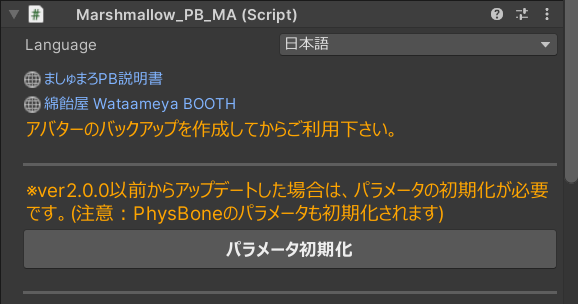
Language
Select the language used in the inspector. Supports English, Korean, and Simplified Chinese.
Reset Parameters
Resets all parameters currently being edited. (Avatar preset and chest-bone assignment are kept.)
Basic Setting
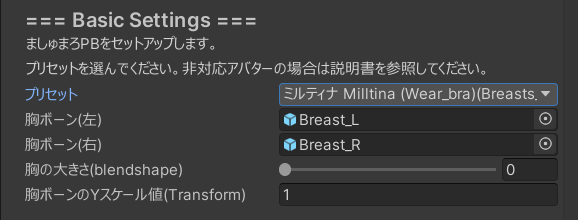
Preset
Select an avatar preset.
If you have many presets and can’t find yours, click the ▼ button to expand the list.
Chest Bone
Select the avatar’s chest bone (usually the upper chest).
Chest Size (blendshape)
For supported avatars, set the value of the “increase chest size” shape key.
If the preset lists a specific shape key name, use that one.
For unsupported avatars, configure it in the same way as for supported avatars, using a chest-size shape key if available.
Chest Bone Y Scale (Transform)
Enter only the Y scale value of the chest bone. (X/Z are not needed.)
It is okay if the actual X/Y/Z scale values on the chest bone differ; the system only uses Y.
PhysBone Setting
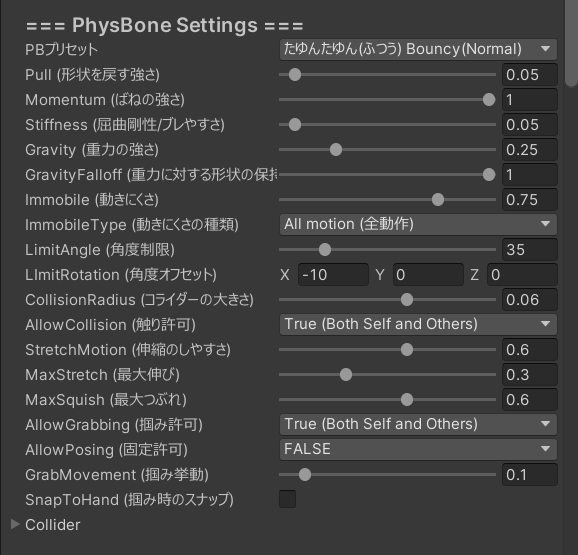
PB Preset
Select a PB preset.
By default there are three types (“Smooth”, “Jiggly”, “Heavier Jiggle”) and each can be chosen in three hardness levels.
You can also add your own presets later.
Pull (Restore Shape)
How strongly the PB tries to return to its original shape.
Momentum (Spring Strength)
Springiness of the PB motion.
Stiffness (Anti-Bend / Anti-Jitter)
How hard it is for the PB to bend and wobble.
Gravity (Strength)
How strongly gravity affects the PB.
Note: Setting this significantly above the default may cause the chest to collapse unnaturally.
GravityFalloff (Shape Retention)
How much the PB maintains its original shape against gravity.
The further the bone rotates away from the initial angle, the less the shape is preserved and the more gravity dominates.
Immobile (Motion Damping)
How resistant the PB is to movement (makes it harder to move).
Does not affect behavior when you press it by hand with a collider.
ImmobileType
Determines which motion Immobile affects.
- AllMotion: Applies to all motion.
- World: Applies only when the avatar is moved in world space (e.g., locomotion, jumping).
With World, Immobile is forcibly treated as 0 during normal small motions, so in most cases AllMotion is recommended.
LimitAngle (Angle Limit)
Maximum angle the PB is allowed to bend.
LimitRotation (Angle Offset)
Offset for the PB’s movement angle.
You can set different values for X/Y/Z, and the same offset is mirrored left/right.
CollisionRadius (Collider Size)
Radius of the PB’s collision sphere.
Increasing this makes it easier to touch/hit the chest.
AllowCollision (Touch Permission)
Who is allowed to touch Marshmallow PB (self / friends / everyone).
StretchMotion (Squish / Elasticity)
Controls how much the chest squishes or stretches due to avatar movement (elastic feel).
Higher values mean stronger deformation when moving forward/backward, etc.
MaxStretch (Max Extension)
Maximum length the PB can stretch.
Higher values allow the chest to stretch further when grabbed; 0 disables stretching.
MaxSquish (Max Squish)
Maximum squish amount.
Higher values allow deeper squish; smaller values make it shallower and reduce clothing clipping.
Setting it to 0 disables squish.
AllowGrabbing (Grab Permission)
Who is allowed to grab Marshmallow PB (self / friends / everyone).
AllowPosing (Pose Lock Permission)
Who is allowed to pose-lock Marshmallow PB (self / friends / everyone).
GrabMovement (Follow Strength)
How closely the PB follows your hand while being grabbed.
Higher values make it follow the hand more tightly.
SnapToHand (Snap Amount)
How strongly the chest snaps to the hand at the moment of grabbing.
If set too high, the movement can feel jerky, so moderate values are recommended.
GrabCurve (Grab Distance Curve)
Curve that defines how the chest position changes relative to the hand when grabbed.
You can use this to fine-tune the feel when pulling the chest.
Inertia Setting (Inertia / Pseudo Multi-Bone)
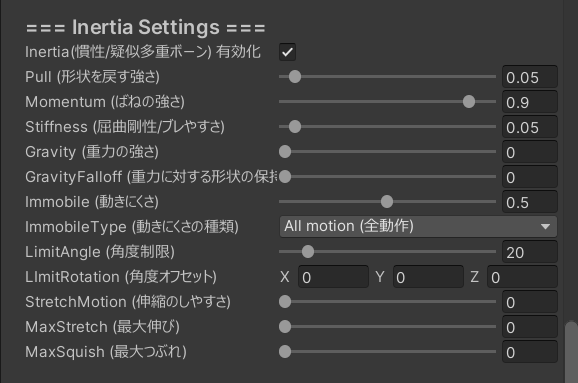
Inertia simulates multiple bones to add extra softness and delay to the motion.
Inertia Strength
How strongly the inertia bones move. Higher values make the chest feel softer and more delayed.
Inertia Follow
How quickly the inertia bones catch up to the main PB motion.
Higher values make them follow more quickly (less delay).
Inertia Immobile
How resistant the inertia bones are to movement. Similar to PB Immobile but applied to inertia.
Inertia Count
Number of inertia bones used. More bones can increase the feeling of softness but also cost more performance.
Parallel Bone Setting
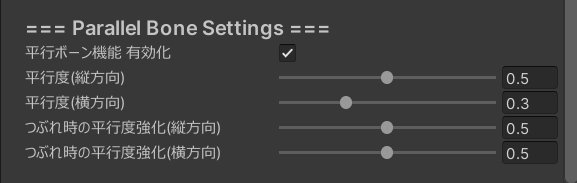
Parallel Bone controls how much the chest bone tries to keep its angle, adding a sense of weight.
Parallel Strength
How strongly the chest bone tries to keep a parallel orientation.
Higher values make the motion more “weighty” and less likely to tilt.
Parallel Degree
How close to perfectly parallel the motion becomes.
Values near 0: strongly parallel; values near 1: closer to normal PB rotation.
Parallel Immobile
How resistant the Parallel Bone motion is to movement.
Too high may make the chest feel stiff.
Gravity Setting
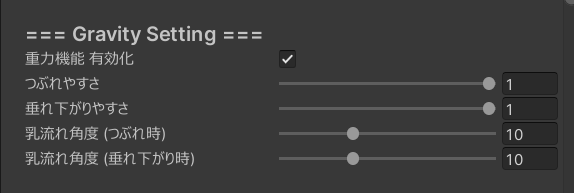
Chest Sag Ease
How easily the chest sags when bending forward.
Higher values increase sagging; 0 disables sagging.
Chest Squish Ease (On Back)
How easily the chest squishes when lying on your back.
Higher values increase squish; 0 disables this effect.
Interference / Squish Setting
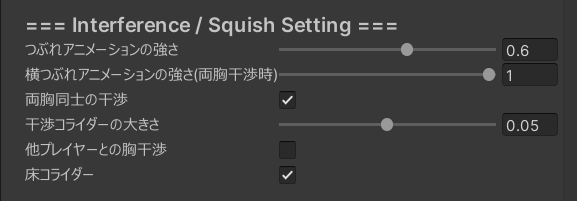
Interference Between Left and Right Chest
Whether to place colliders so that the avatar’s left and right chests interfere with each other.
When on, pressing both together will cause them to squish against each other.
Interference Collider Size
Size of the colliders used for interference between left and right chests.
Chest Interference with Other Players
Whether Marshmallow PB should interfere with Marshmallow PB on other players.
Can also interact with head or body colliders depending on the setup.
This can be toggled from the in‑game menu.
Floor Collider
Whether the chest should collide with the floor collider.
When enabled, the chest will squish when lying prone, etc.
Anti-Penetration Setting
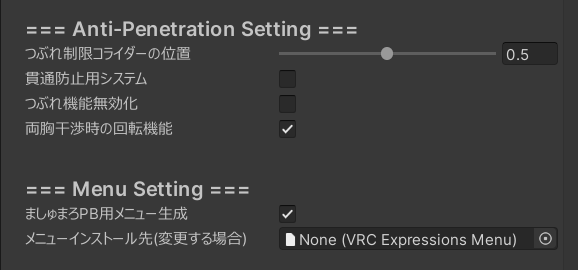
LimitColliderPosition (Squish Limit Position)
Position of the collider that limits how far the chest can squish.
Higher values make it harder to squish deeply.
This is added on top of normal PB squish and gravity squish, and is mainly for preventing clipping with clothes.
Anti-Penetration System
Enables the anti-penetration system.
Both chest bones will follow each other, reducing clipping where only one side moves.
Disable Squish Function
Completely disables Marshmallow PB’s squish function.
Can also be toggled from the in‑game menu.
Use this if you want to prioritize avoiding clipping over deformation.
Rotation When Both Chests Interfere
Enables a small rotation when both chests interfere.
When both chests are squished together, the bones rotate slightly outward to reduce clipping.
Menu Setting

Generate Menu for Marshmallow PB
Generates an EX menu for Marshmallow PB.
The menu lets you toggle:
- Chest Interference with Other Players
- Anti-Penetration System
- Disable Squish Function
- Switch to Normal PB
- Disable PB
Menu Install Destination (Optional)
Changes where the menu is installed in your avatar’s menu tree.
If nothing is specified, it is added to the top level.
Advanced Setting
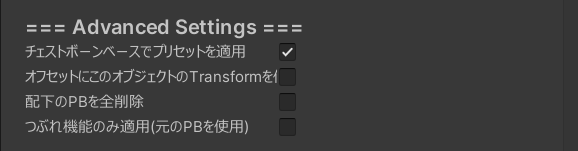
Apply Preset Based on Chest Bone
Applies the preset using the chest bone as the origin.
Because it uses the relative position from the chest bone, it continues to work even if you change the avatar’s proportions or position in Unity.
If you make large bone-structure changes in Blender, etc., treat the avatar as unsupported and set it up manually.
Use This Object’s Transform as Offset
Uses the position of marshmallow_PB_Setup as an offset for Marshmallow PB’s position, rotation, and scale.
For example, if the avatar’s body is moved upward by heels, the default preset may cause Marshmallow PB to drift.
Turn this on and move marshmallow_PB_Setup up by the same amount to correct it.
In many cases, “Apply Preset Based on Chest Bone” is enough; if it still drifts, adjust using this option.
Remove All PB Under This Bone
Deletes all PB components under the specified chest bone.
Normally only the PB directly under the chest bone is removed, but if an unsupported avatar has a complex structure, enable this option.
Apply Only Squish Function (Use Original PB)
Keeps the avatar’s original PB and applies only Marshmallow PB’s squish function.
In this mode, Marshmallow PB’s jiggle is disabled and only the original PB’s motion is used.
If you use this, turn off Allow Grabbing on the original PB.
PB Preset Setting
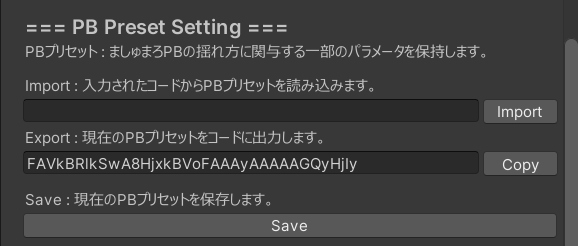
Import
Reads a PB code string and applies it to the PB settings.
The code stores the settings of PhysBone, Inertia, and Parallel Bone that affect jiggle (excluding angle limits, permissions, etc.).
Export
Converts the current PB settings into a PB code string.
You can share this code to easily share Marshmallow PB settings via SNS, etc.
Save
Saves the current PB settings as a PB preset.
The saved preset is added to the PB Preset list.